
Feature · Optional
A free salah tracker app inside your daily planner
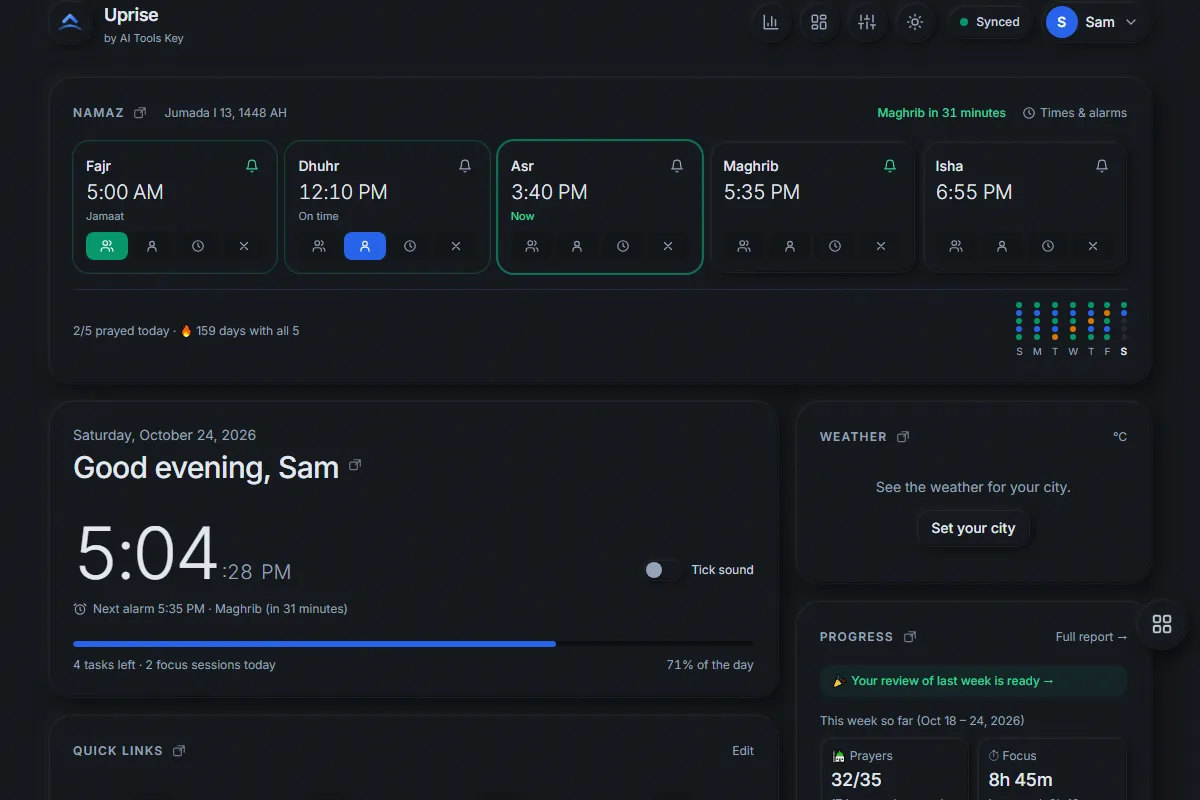
Uprise includes an optional salah tracker app for Muslims. You log each of the five daily prayers as prayed with jamaat, on time alone, late (qaza) or missed. You can set an alarm for every prayer, see your streak and the Hijri date, and find your prayers in the same reports as your tasks and focus time.
What is the Uprise salah tracker?
Uprise is a free productivity web app by AI Tools Key, and the salah tracker is a namaz card at the top of your Uprise dashboard. It shows Fajr, Dhuhr, Asr, Maghrib and Isha with your local prayer times, highlights the current prayer and counts down to the next one. One tap records how you prayed. Because it lives next to your tasks and Pomodoro timer, your prayers shape the day instead of competing with it.
The tracker is optional. During setup Uprise asks whether you want it, and you can switch it on or off at any time in Settings. When it is off, every prayer feature — the card, prayer alarms, the Hijri date, prayer statistics and Islamic quotes — is hidden, and your prayer history is kept safely for when you turn it back on.
How do you track a prayer?
Each prayer has four clear buttons. Your choice changes the colour and the label, and it counts toward your streak and goals:
| Status | Meaning | Counts as on time? |
|---|---|---|
| Jamaat | Prayed in congregation (mosque) | Yes |
| On time | Prayed on time, alone or at home | Yes |
| Late | Prayed after its time (qaza) | No — tracked separately |
| Missed | Not prayed | No |
Can Uprise remind me to pray?
Yes. Turn on an alarm for any prayer and choose when it rings: at the prayer time or 5, 10, 15, 20 or 30 minutes before. Pick a sound and use snooze if you need a few minutes. The next prayer alarm also shows under the clock.
An honest note: prayer alarms ring while Uprise is open — the browser tab or the installed app can be in the background on your computer. With Settings → Notifications turned on, prayer alarms also arrive as a notification when Uprise is closed (on iPhone after Add to Home Screen); a notification uses your phone’s normal notification sound, not a long alarm.
Where do the prayer times come from?
You type them in, from your mosque or a prayer calendar you trust. Uprise does not guess times from your location, which keeps your location private and lets you follow your own mosque’s timetable. Update the times whenever they change through the year; it takes a few seconds in “Times & alarms”.
What else does the prayer tracker include?
- Streaks and a 7-day view so you can see the week at a glance.
- The Hijri date on the card, with a ±2-day adjustment to match your local moon sighting.
- Prayer goals for the week, month or year: prayers on time, prayers with jamaat, or days with all five prayers — filled in automatically.
- Reports for day, week, month and year that show prayers next to tasks, focus time and habits, and up to 400 days of history.
- Islamic daily quotes — Quran verses with surah and ayah, and authentic hadith with their source — if you want them.
- Helpful presets such as a “Read Quran” habit and Eid and Ramadan countdowns.
Salah tracker FAQ
Is the salah tracker free?
Does Uprise calculate prayer times automatically?
Can I track prayers in jamaat separately?
What happens if I turn the prayer tracker off?
Will the prayer alarm ring on my phone?
Does it show the Hijri date?
Add your prayers to your day
Free, no credit card. Works in your browser and installs on your phone and computer.