
Feature · Planning & reviews
A daily planner app with a weekly review
Uprise is a free daily planner app with a weekly review built in. Plan the day with prioritised tasks and a Top 3, wrap it up each evening, and look back with reports for the day, week, month and year. Short reflections turn your history into better plans for next week.
How do you plan a day in Uprise?
Uprise is a free productivity web app by AI Tools Key that works in any browser, offline and on every device. Start with your task list. Each task can have a priority (high, medium or low), a due date and time with a reminder, a tag (type #work in the task), subtasks and a note. Star up to three tasks as today’s Top 3 — the things that make the day a good day even if nothing else gets done.
Sort by priority, due date or your own drag-and-drop order, and filter by tag. Finished tasks clear at midnight and unfinished ones roll over to tomorrow, so the list stays short. Thoughts that pop up while you focus land in a small inbox, ready to become tasks later.
What is the daily review?
From 6 pm, Uprise invites you to wrap up your day. The day review shows what you finished, your focus sessions and whether you met their goals, your habits and (if you use it) your prayers. Then you plan tomorrow: pick the next Top 3 while today is still fresh. It takes about two minutes and makes the next morning much easier.
How does the weekly review work?
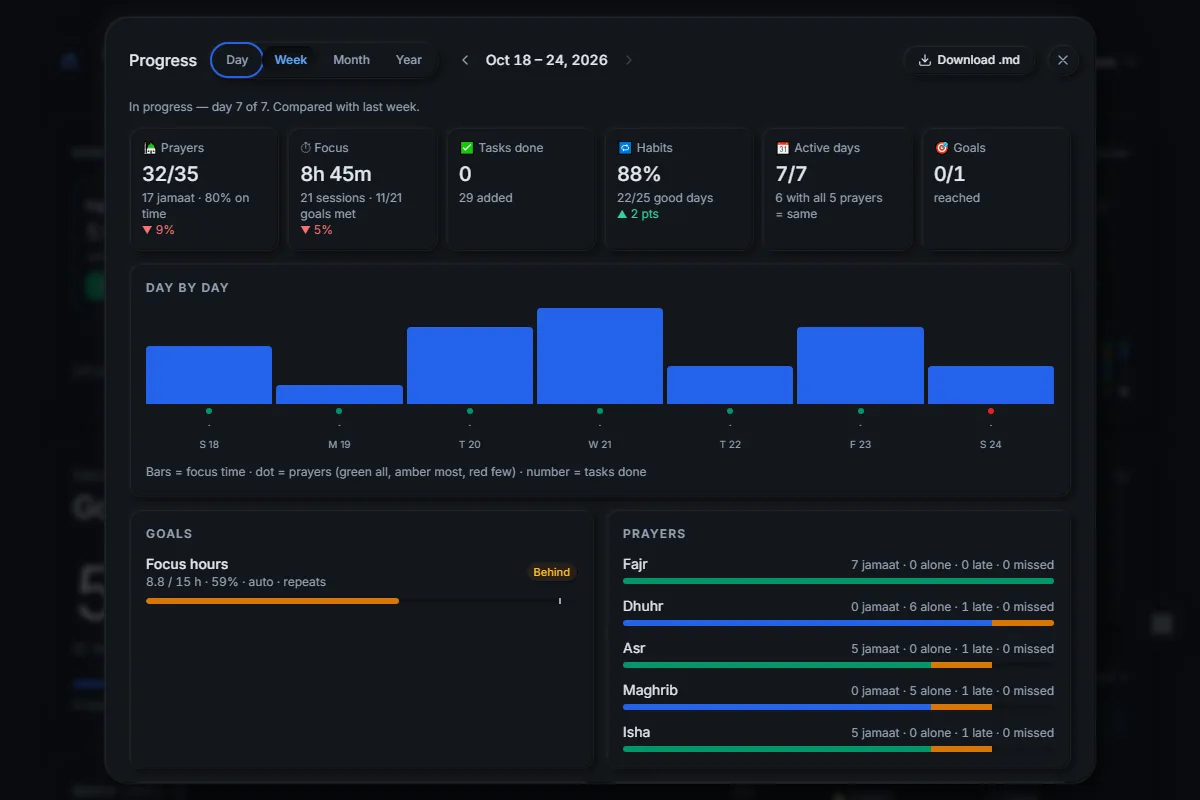
At the start of each week Uprise tells you that last week’s review is ready. The report compares the week with the one before:
- tasks completed, including your Top 3 tasks,
- focus sessions and focus hours, with session goals met,
- habit success and streaks, goal progress, and active days,
- prayers on time and with jamaat, if the prayer tracker is on.
Under the numbers, two short questions help you reflect: What went well? and What will I improve next week? Your answers are saved with the report. Monthly and yearly reports work the same way, and any report can be downloaded as a Markdown file for your notes.
What else is on the planner dashboard?
| Tool | What it does |
|---|---|
| Mini calendar | Shows days with activity and tasks due; click a day to see it |
| Activity history | 400 days of history with a heatmap and a daily score |
| Alarms | One-time or repeating alarms with snooze |
| Countdowns | Days left to a trip, a deadline or a birthday (repeats yearly) |
| Notes | Markdown notes with checkboxes, pinning, search and .md download |
| Quick links & weather | Your four favourite sites and today’s weather |
Move cards around or hide the ones you do not need with “Customize layout”, and use keyboard shortcuts such as N for a new task, R for the weekly report and D for the day review.
Daily planner FAQ
Is the Uprise daily planner free?
What happens to unfinished tasks?
Can I get reminders for tasks?
Can I review a whole month or year?
Can I export my planner?
Does the planner work on my phone?
Plan tomorrow tonight
Free, no credit card. Works in your browser and installs on your phone and computer.