
Feature · Focus
Online Pomodoro timer with tasks
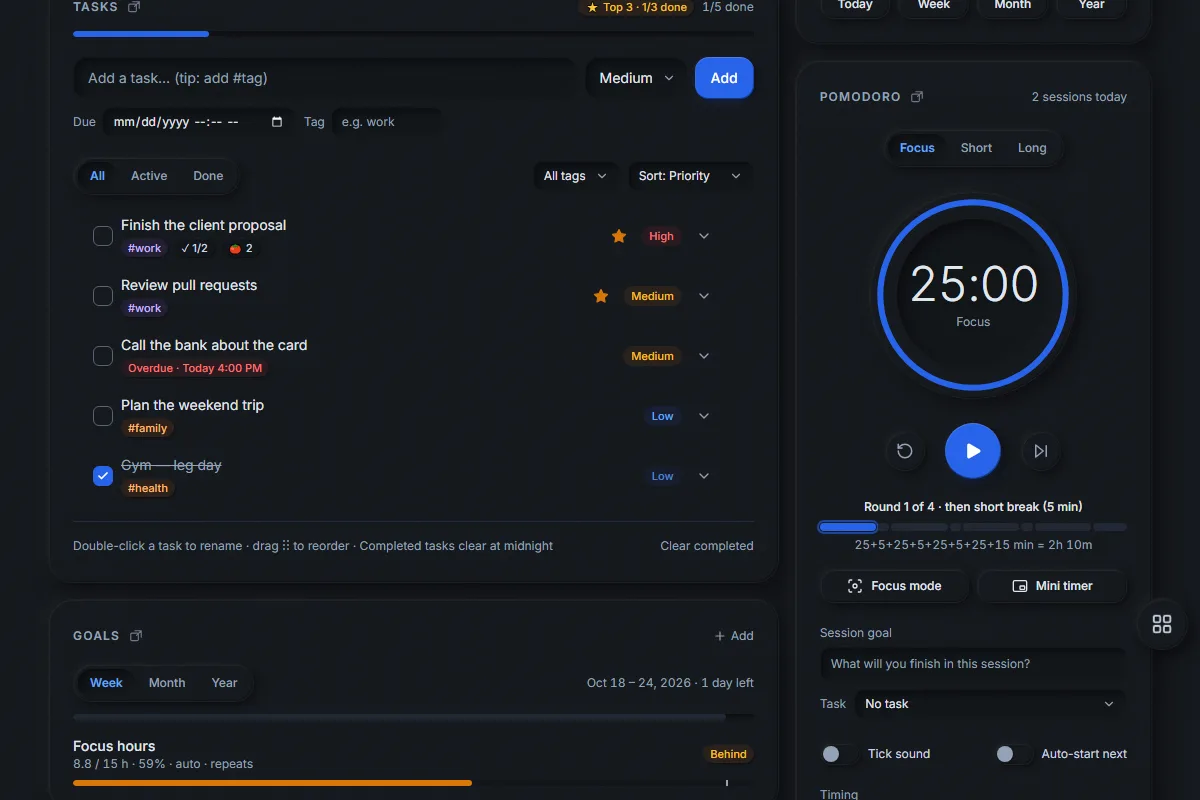
Uprise has a free online Pomodoro timer with tasks built in. Pick a task, write one goal for the session, and focus for 25 minutes (or any length you choose). After four rounds you get a longer break. Every session is saved, so you can see how much deep work you did today, this week and this year.
What is the Pomodoro technique?
The Pomodoro technique is a simple way to work with focus: you work on one thing for a fixed time — classically 25 minutes — then take a short break of about 5 minutes. After four focus rounds you take a longer break of 15 to 30 minutes. Short, timed sprints make it easier to start, harder to drift, and they protect you from working for hours without rest.
Uprise is a free productivity web app by AI Tools Key that works in any browser and installs on phones and computers. Its Pomodoro timer follows this rhythm but lets you change every number. It is part of a full productivity planner app, so the timer knows about your tasks, goals and habits instead of living in a separate tab.
How do you use the Uprise focus timer?
- Choose a rhythm. Use a preset — 25/5 (classic), 50/10 (deep work) or 15/5 (easy start) — or set your own minutes.
- Press start. A short “Ready to focus?” checklist asks for a session goal and lets you link a task. You can turn the checklist off.
- Focus until the ring is full. Open focus mode to hide everything except the timer, or pop out the floating mini timer while you work in another app.
- Take the break. Uprise rings, suggests a break (stretch, drink water, rest your eyes) and reminds you to skip social media.
- Check in. After each session, mark whether you reached your goal, add a note, and tick the task as done if it is finished.
Can I customise the Pomodoro rounds?
Yes. You decide the focus minutes (1–180), the short break (1–60), the long break (1–90) and how many focus rounds come before the long break (1–12). Uprise draws the whole cycle so you always know where you are — for example 25+5+25+5+25+5+25+15 means four 25-minute rounds with 5-minute breaks and a 15-minute long break, about 2 hours 10 minutes in total.
| Preset | Focus | Short break | Long break | Good for |
|---|---|---|---|---|
| Classic | 25 min | 5 min | 15 min | Most daily work |
| Deep work | 50 min | 10 min | 30 min | Writing, coding, study |
| Easy start | 15 min | 5 min | 15 min | Days when starting is hard |
What makes this Pomodoro timer different?
- Tasks and timer together. Link a session to a task; Uprise counts the Pomodoros spent on each task.
- Session goals and check-ins. Write what you will finish, then record “yes, partly or no” afterwards — your reports show how often you hit your goals.
- Focus mode. The timer fills the browser tab, with a small “stray thought” box: type a distraction, press Enter, keep going. The thoughts wait in your task inbox.
- Floating mini timer. In Chrome and Edge the mini timer floats above your other apps; elsewhere it opens in a small window.
- Optional tick sound in three styles, plus auto-start for the next session.
- Accurate in the background. The timer uses real clock time, so it stays correct when the tab is in the background or you reload the page.
- Your focus history. A 7-day chart on the card, plus focus minutes in the daily, weekly, monthly and yearly reports and the 400-day activity heatmap.
- Keyboard friendly. Press P to start or pause and F for focus mode.
Does the timer ring when the app is closed?
Today the Uprise timer and alarms ring while Uprise is open — the tab can be in the background, or the installed app can be in the background on your computer. On phones, keep Uprise open during a session. Alarms and reminders can also arrive as notifications when Uprise is closed (Settings → Notifications); the focus timer itself needs Uprise open.
Pomodoro timer FAQ
Is the Uprise Pomodoro timer free?
How long is a Pomodoro in Uprise?
Can I link a Pomodoro to a task?
Does the timer keep running if I switch tabs?
Can I see how much I focused this week?
Is there a floating timer?
Start your first focus session
Free, no credit card. Works in your browser and installs on your phone and computer.